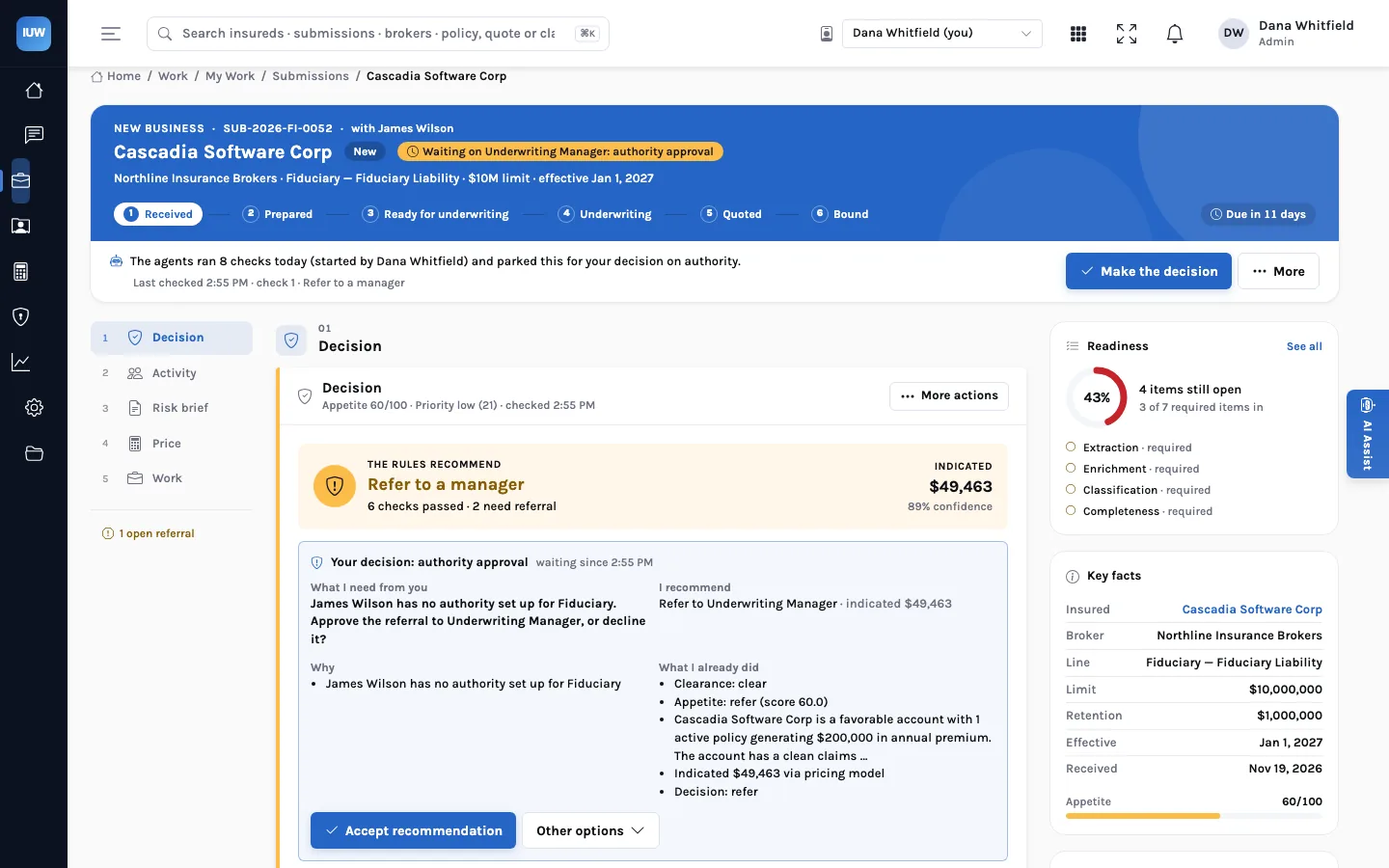
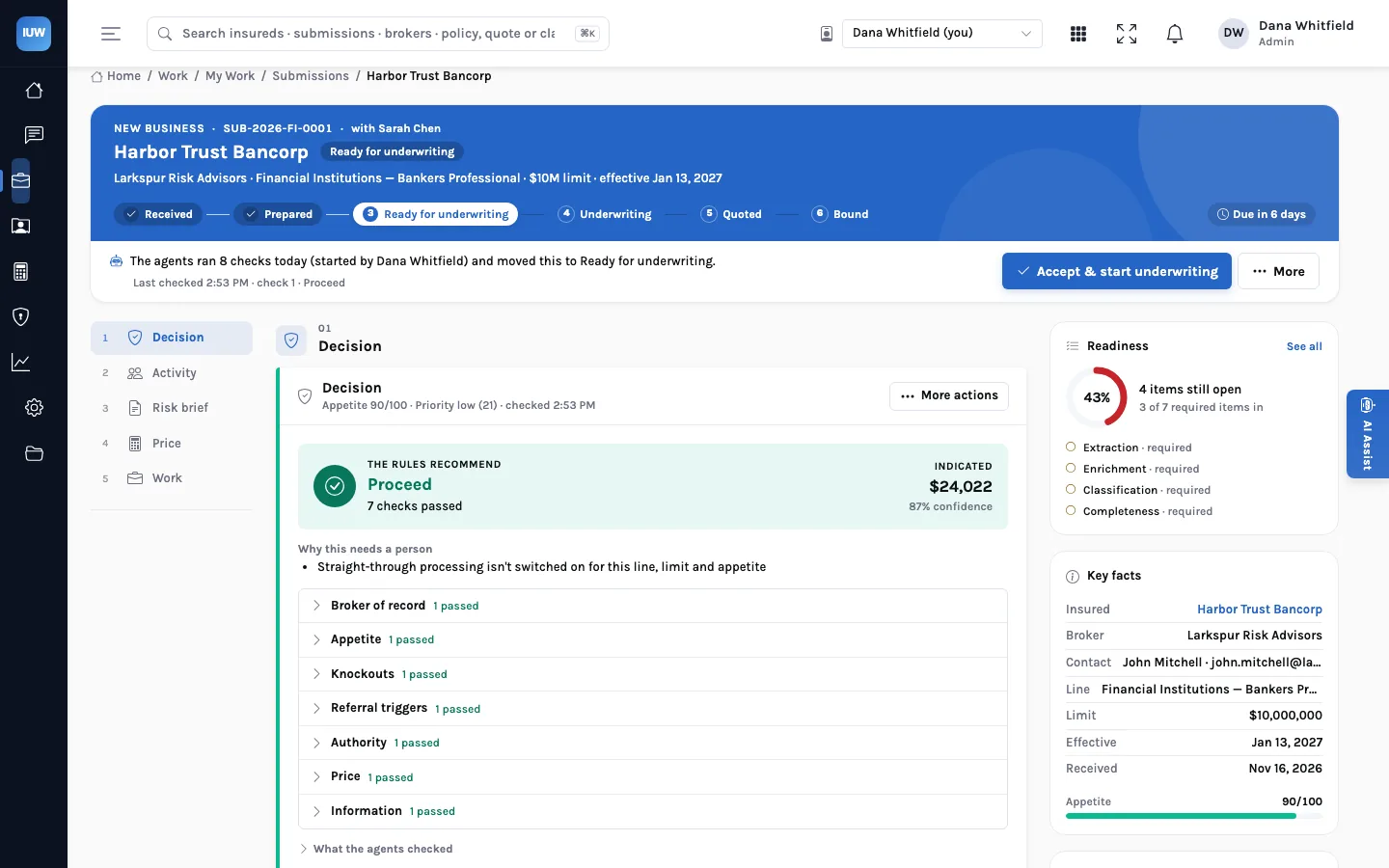
When a submission arrives, or when someone presses Analyze this submission, InsightUW runs a fixed sequence of steps over it. Each step is done by an agent at the autonomy level the carrier has set, and each one writes down what it found. By the time an underwriter opens the file, the preparation is done and the reasoning is on the page.
In short
- Eight steps: extract, clear, appetite, enrich, brief, price, decide and gate.
- Each step records an insight: a headline, its drivers, a confidence, a suggested action and whether anything changed.
- Steps are independent. One failing is recorded and the rest still run; any step can be re-run on its own.
- The gate either advances the submission to ready for underwriting or parks it at a checkpoint with a prepared decision.
The steps
1. Extract
The documents on the submission (the application, loss runs, schedules, the broker's email) are classified and their fields extracted, so the later steps work on data rather than PDFs.
2. Clear
Clearance checks the submission before anyone spends time on it: sanctions screening, duplicates, conflicts over the broker of record, and the carrier's own clearance rules.
3. Appetite
The appetite rules for the line say whether the risk is one the carrier wants: in, out (a knockout), or refer. When the rules disagree, or appetite says refer, the appetite checkpoint fires later.
4. Enrich
The account is filled out from what the carrier already holds and from configured outside sources, such as financial, industry or news data for the insured.
5. Brief
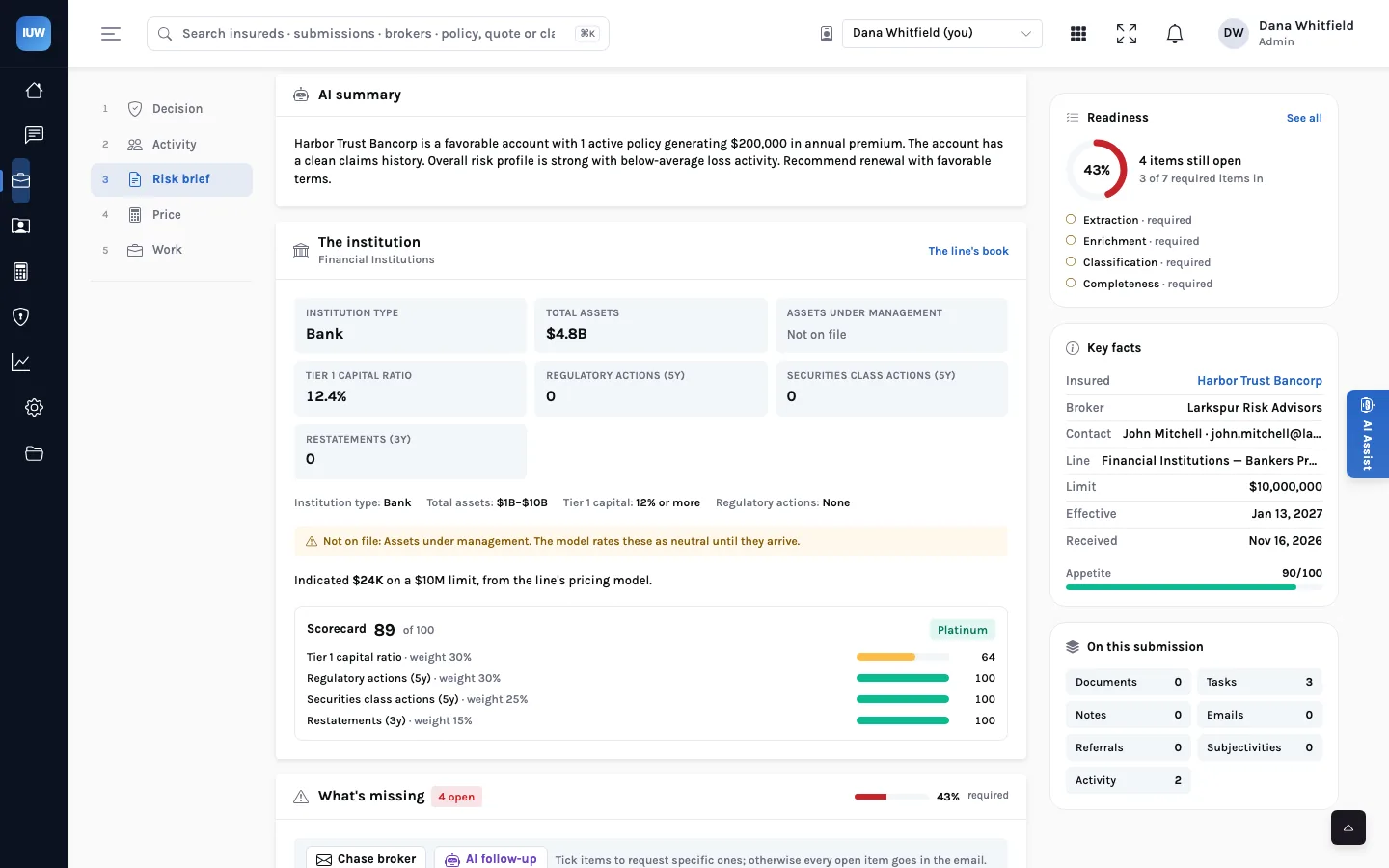
The risk brief puts the picture together: a summary, the line-specific profile (for a bank, its institution type, total assets, capital ratio, regulatory and securities actions, restatements), a scorecard against the line's model, and what is still missing.
6. Price
The indicated price comes from the line's pricing model: a base premium from the exposure, then each rating factor's adjustment, and an indicated premium with a likely range and a confidence that says how many of the rating features were available. The financial institutions example walks through one.
7. Decide
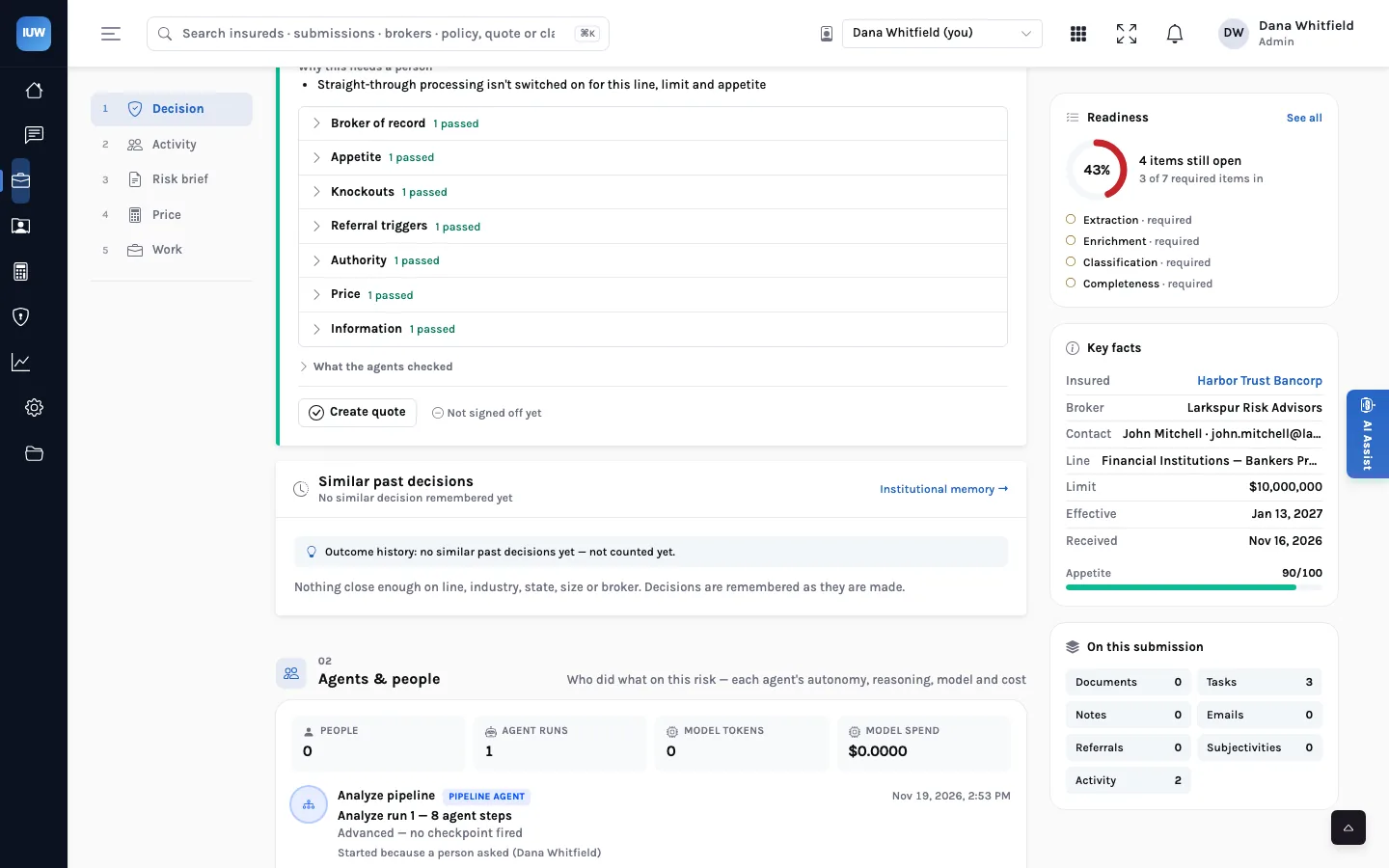
The decision record gathers the checks into a recommendation (proceed, refer or decline) with the indicated premium. Each group of checks is listed with its result: broker of record, appetite, knockouts, referral triggers, authority, price and information.
8. Gate
The gate reads the decision record and the checkpoint rules. If no checkpoint fires, the submission advances to Ready for underwriting (and, where the carrier has switched on straight-through quoting for that line, the agent can quote it). If a checkpoint fires, the submission is parked and waits for a person, with the decision prepared. Checkpoints have their own article.
What gets recorded
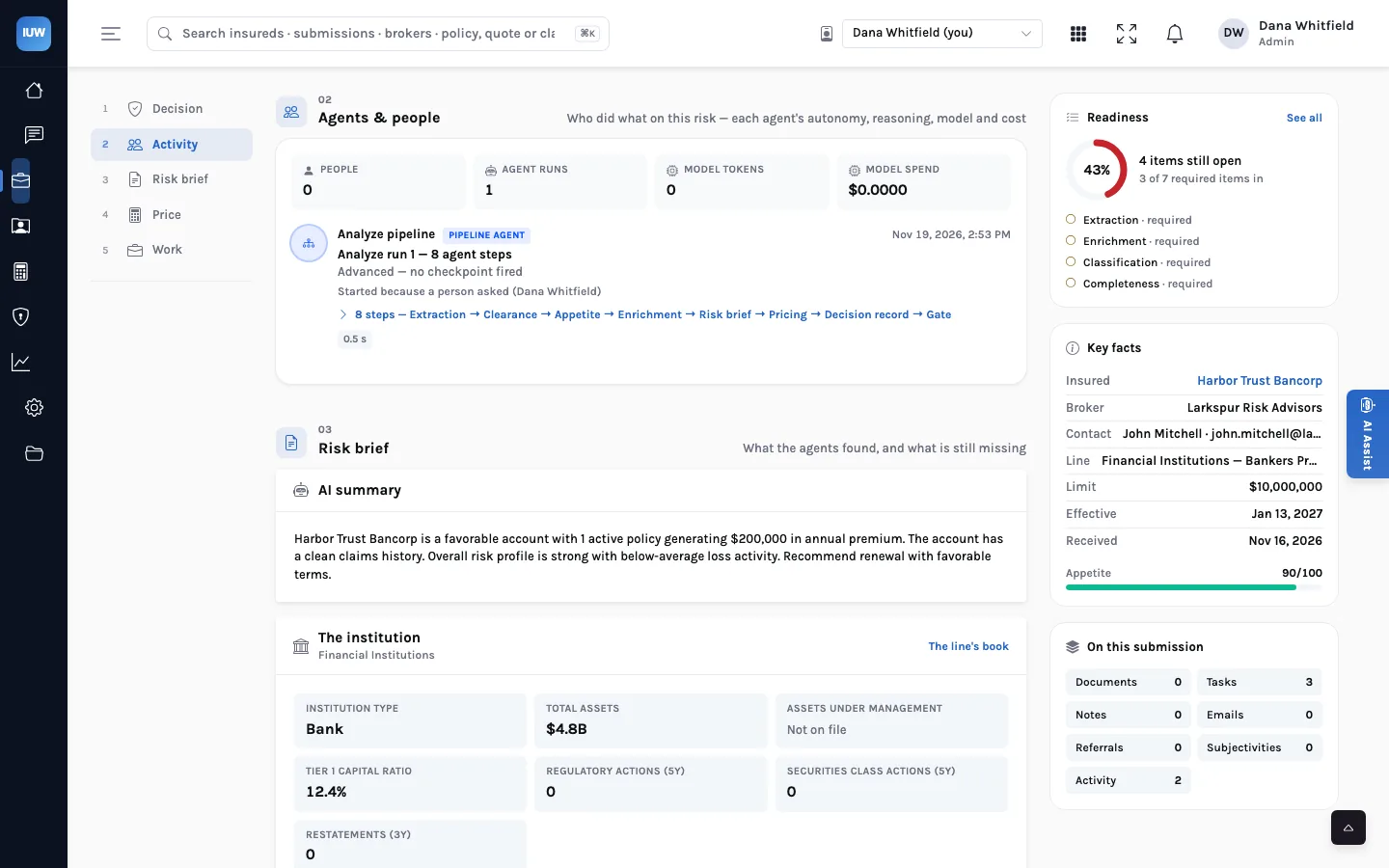
A run and each of its steps are stored. The Activity zone of the submission shows it as a line: Analyze run 1 — 8 agent steps, who started it, the path it took (extraction, clearance, appetite, enrichment, risk brief, pricing, decision record, gate) and how long it took, alongside the people, the agent runs, the model tokens used and the model spend for the risk.
Failures don't stop the run
Every step is idempotent and can be re-run on its own (Run step…). If one fails, for example enrichment because an outside source is down, the failure is recorded and the other steps still run; only the decision and the gate need the others. Readiness on the right shows which required items are still open.
When it runs
- On arrival: when a submission is received or a new document arrives. Automatic runs are on by default and can be switched off for a deployment.
- On demand: the Analyze this submission button, or the API.
- One step at a time: any step can be re-run, a question answered, or a manager can set the state by hand.
Re-running one step after the broker replies
Priya, an underwriter at the fictional Harborline Specialty, has a submission parked because a required loss run is missing. With automatic runs switched on, the broker's reply with the document starts Analyze again; the information checkpoint no longer fires, and the gate moves the submission on. Priya sees it in What needs me as ready, with the price recalculated from the new loss history.
What each step reads, and what stops it
| Step | Reads | When it can't do its job |
|---|---|---|
| Extract | The submission's documents | No documents: it records that and suggests asking the broker. If intake already started an extraction, it waits for that one instead of running a second |
| Clear | Clearance rules, sanctions, other submissions and policies for the same insured | A failure is recorded on the step; an insured matched from another broker (on name, FEIN or address) opens a broker-of-record case |
| Appetite | The line's appetite rules and the extracted fields | Rules that need data the submission doesn't carry are listed as needing data, not silently passed |
| Enrich | Configured outside providers and the carrier's own records | No providers configured: recorded as not configured; licensed providers that aren't set up are not simulated |
| Brief | Everything above, plus priority scoring | Without a language model the summary is written from the account's records |
| Price | The line's rater | No rater: it says so and leaves the premium empty |
| Decide | Every check's result | Needs the earlier steps; runs on whatever they produced |
| Gate | The decision record and the checkpoint rules | No decision record: skipped, with a prompt to run decide |
Where the price comes from
The price step never makes a number up. It looks for a rater in a fixed order: a completed pricing quote already on the submission (re-rated if the risk record has changed since), then a published pricing model for the line, then a published desk-rate table. If a model exists but lacks inputs, the step names the missing ones. If nothing is configured, the answer is no rater configured for this line. The likely range shown beside the indication is a fixed spread either side of it (15% by default), and is labelled as a range, not as a confidence.
Small details that matter in practice
- A new document re-runs part of the pipeline, not all of it: extract, price, decide and gate. Clearance and appetite results stand unless someone re-runs them.
- Runs are debounced. Several documents arriving within a minute start one run, not several.
- An unassigned submission is routed after clearance by the route rules, first match wins. An assigned one is left alone.
- A bound submission is not re-parked. If a document arrives after the bind, the re-check is recorded and the gate has nothing to decide.
Trying it without changing anything
A dry run executes every step and reports what it would do: the outcome, the status before and after, and which checkpoints would fire at which level. Everything it wrote is rolled back at the end, so the submission, its decision record and its status are untouched. Steps that read from outside providers still read from them; nothing is sent. It is the safest way to see what a rule or threshold change will do to a real file.
Questions buyers ask
Can we change the order of the steps?
No. The sequence is fixed, because each step relies on the ones before it. What you configure is what each step uses: rules, providers, raters and the checkpoints at the gate.
What if we only want clearance and appetite on arrival?
Any step can be run on its own, and automatic runs can be switched off for a deployment, leaving Analyze to be started by a person or the API. Skipping a step from a prepared decision needs a reason, which is recorded.
Screens show a local InsightUW workspace with made-up insureds, brokers and underwriters. Nothing here is a statement about any real company's risk.