Inside the Policy Comparison & Proofing Agent: From a Day of Highlighters and Excel to a Structured, Auditable Result
Engineering note. The companies and people in the examples below are made up to illustrate the design. For a walkthrough with product screens, see the InsightUW blog.
Every renewal and every bind produces the same quiet, expensive chore: line up the expiring policy against the new quote, binder, and issued policy; check the tower; reconcile the schedule of underlying against the carrier docs; and prove the numbers, dates, forms, and names all tie out. Today that lives in a lined-up Excel tower, a Word/Excel proofing checklist ticked from memory, and printed docs marked with highlighters — slow, uneven, and invisible to the audit trail. The Policy Comparison & Proofing Agent does the extraction, comparison, and validation, and hands the underwriter a structured result to review — so the judgment stays human and the transcription goes away.
Three capabilities, one job
The feature is three capabilities under one agent. The important thing about the order is that C is the foundation — the canonical taxonomy is what lets a quote's "Per Occ Limit," a policy's "Each Occurrence Limit," and a OneShield export's EO_LIMIT be recognized as the same field, so a comparison isn't defeated by a rename and a check isn't skipped because the label didn't match.
| Capability | What it does | Replaces (manual today) |
|---|---|---|
| A · Validation / Proofing | Validates each document against predefined checks → a success / fail analysis, with the failing field cited to its source. | Walking a Word/Excel checklist, ticking pass/fail from memory, marking up docs. |
| B · Comparison | Field differences, endorsement diffs, tower analysis, and schedule-of-underlying reconciliation. | Lining up the tower in Excel; print-compare of quote vs binder vs policy; hand notes. |
| C · Product Rationalization | Standardizes field names, removes duplicates, and rationalizes product metadata → a standard product taxonomy and a deduplicated field inventory. | Field cleanup "by group" in the workshop spreadsheet; reconciling inconsistent field names by hand. |
Start: upload the document set
The underwriter or account coordinator drops in the documents a renewal actually arrives as — the expiring policy, the new quote, the binder, the underlying tower, and the OneShield field export. Every uploaded file is stored in S3 and auto-classified by type; the agent then extracts, rationalizes, compares, and proofs.
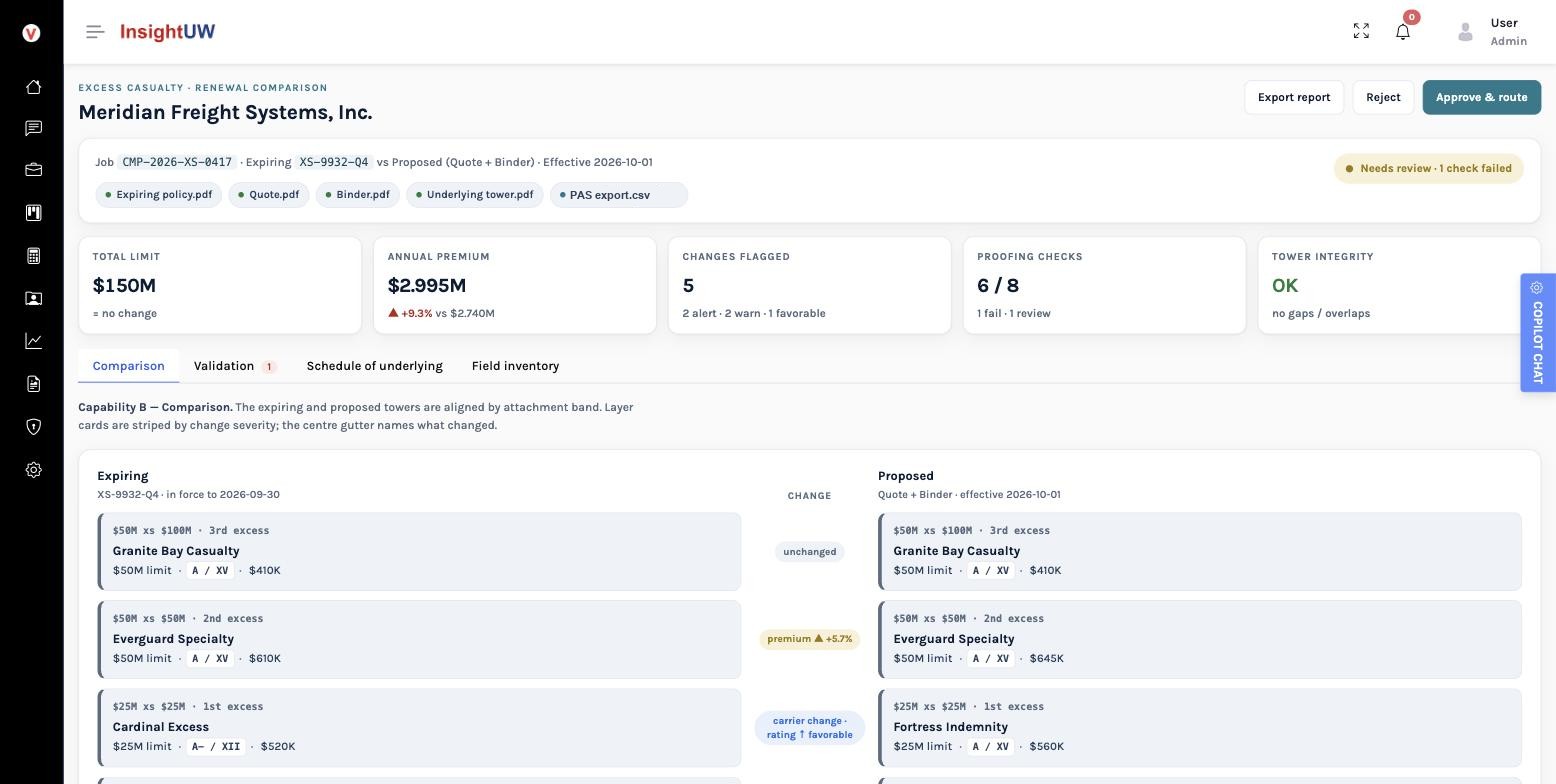
Comparison: the tower, side by side (Capability B)
The expiring and proposed towers are aligned by attachment band. Each layer card is striped by change severity, and the centre gutter names exactly what changed — a premium increase, a carrier swap (flagged favorable when the AM Best rating improves), a new or dropped endorsement. The KPI strip up top summarizes total limit, premium movement, the count of changes, the proofing tally, and tower integrity before the underwriter reads a single row.
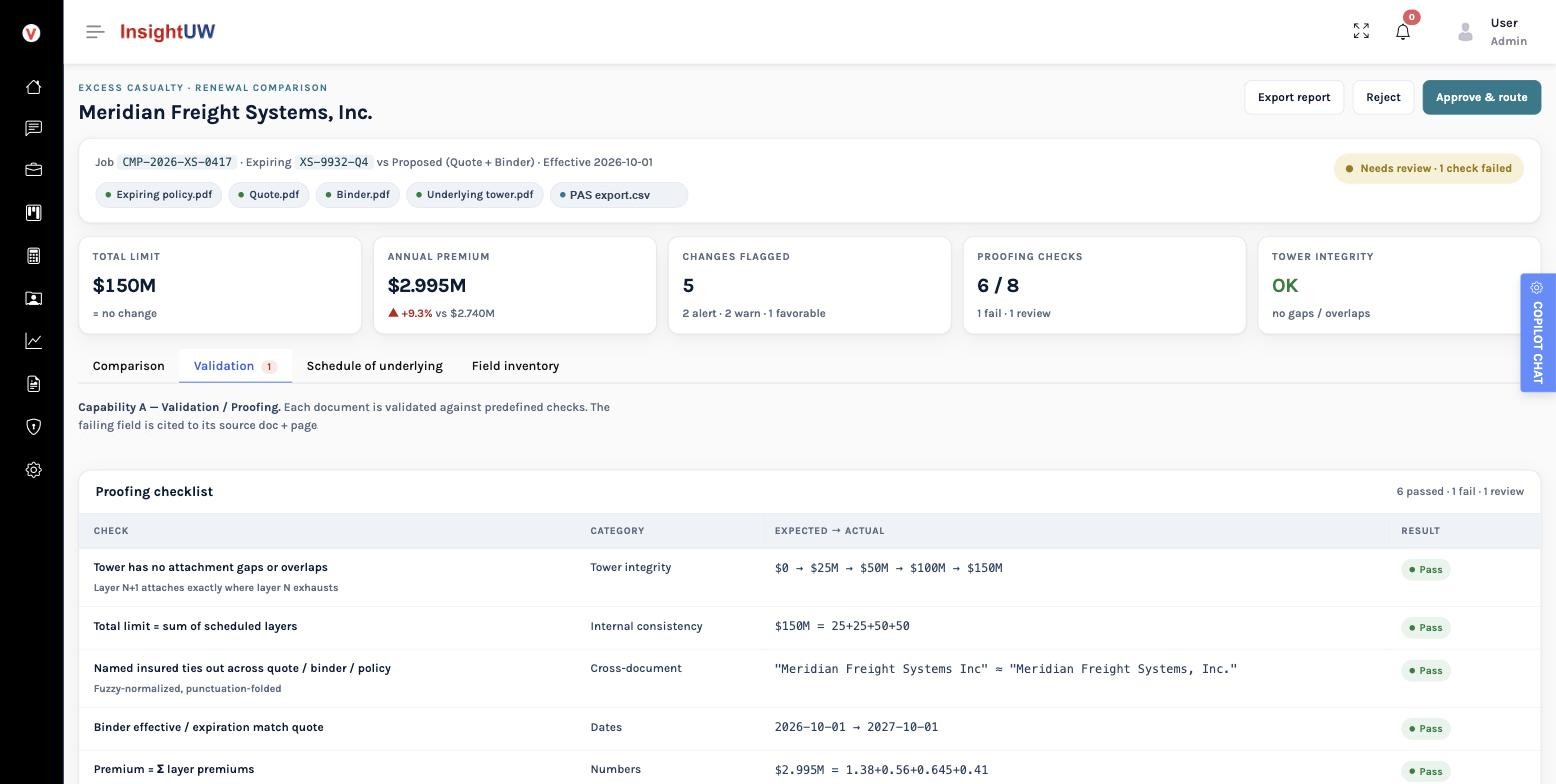
Validation: predefined checks, cited (Capability A)
Each document is validated against a checklist and the result is a plain pass / fail / needs-review — with the failing field cited to its source document and page, replacing the hand-highlighter step. Checks include tower integrity (no attachment gaps or overlaps), total limit equals the sum of layers, premium equals the sum of layer premiums, named-insured tie-out across quote/binder/policy, and a tie-out against the OneShield export, which is treated as ground truth.
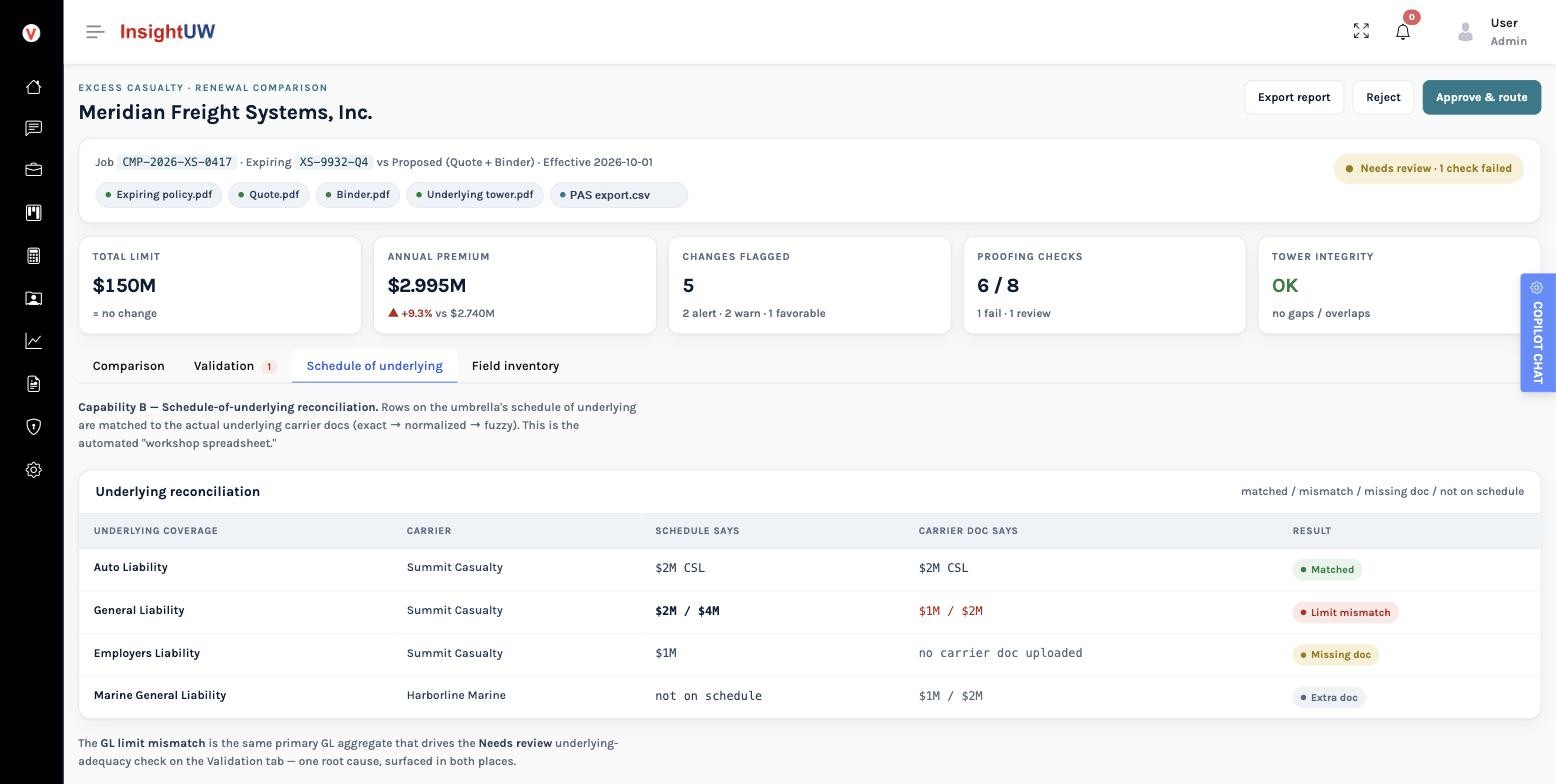
Schedule-of-underlying reconciliation (Capability B)
For excess and umbrella business, the rows on the umbrella's schedule of underlying are matched to the actual underlying carrier docs — exact, then normalized, then fuzzy. The result is the automated version of the "workshop spreadsheet": matched, limit-mismatch, missing-doc (on the schedule but no carrier doc uploaded), and not-on-schedule (a carrier doc with no matching schedule row).
The field inventory that makes it all possible (Capability C)
Every field seen across the uploaded documents is mapped to one canonical taxonomy entry, deduplicated, and checked for agreement. Where the same canonical field carries different values across documents, it's flagged as a conflict; where a label doesn't resolve, it's surfaced as map once and learned into the tenant's taxonomy so it resolves automatically next time.
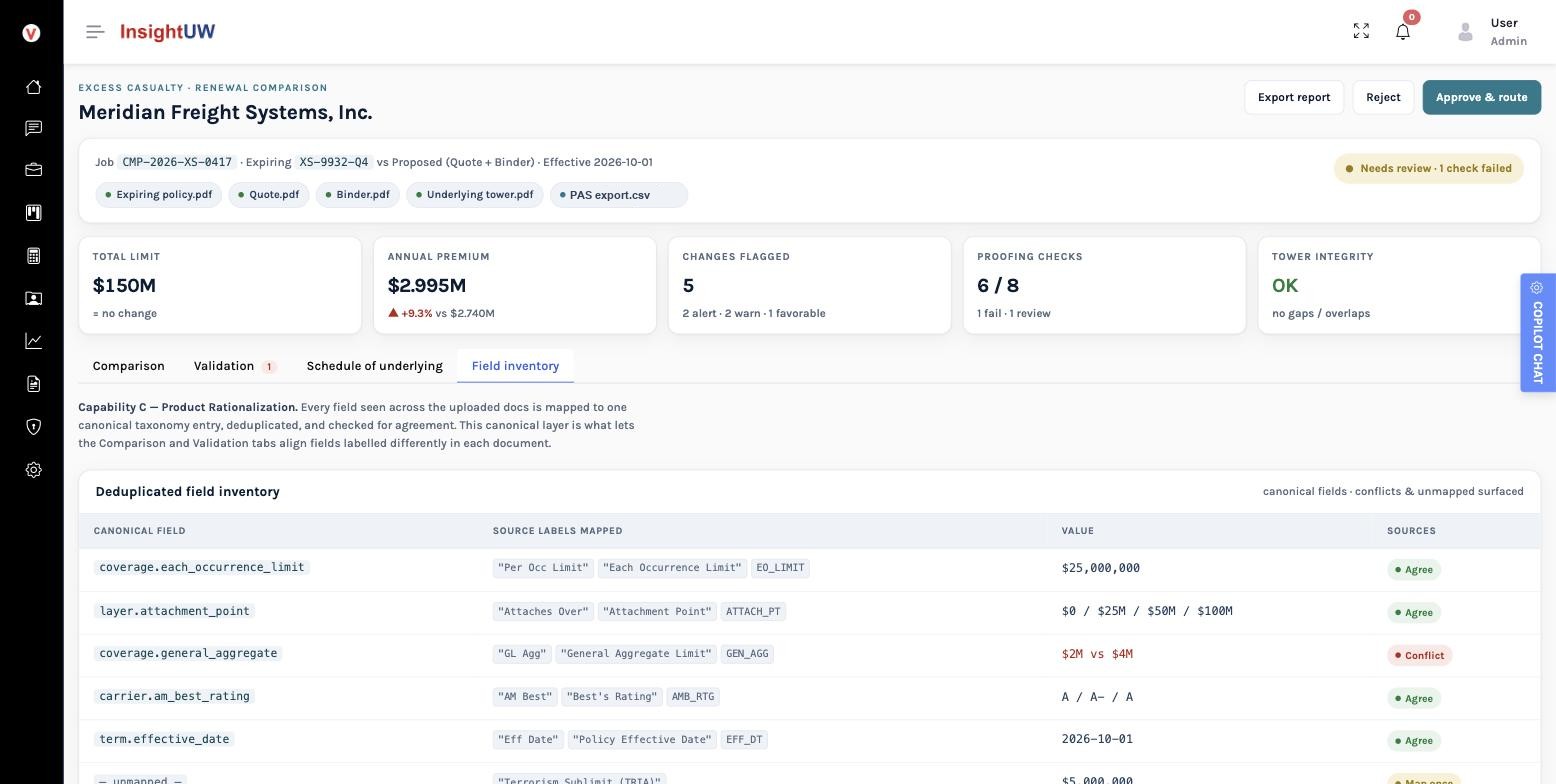
One root cause, three tabs. The primary general-aggregate figure shows up as a value conflict on Field Inventory ($2M vs $4M), a limit mismatch on the underlying reconciliation, and a needs-review adequacy check on Validation — the kind of connect-the-dots that is invisible in the manual highlighter process.
How the engine works
The comparison is deterministic, not a black box. Field names resolve to the canonical taxonomy by exact synonym, then normalized match, then fuzzy similarity. Tower layers align by attachment point; premium deltas fall into severity tiers; a carrier change is scored favorable or not by comparing AM Best ratings; endorsements are diffed for adds and drops. Every proofing check is a rule with a computed expected-vs-actual. The LLM's only job is to narrate — turning the structured result into readable rationale — never to set a number or a pass/fail. Same inputs always produce the same result.
| Stage | What happens |
|---|---|
| 1. Ingest | Documents stored in S3, classified by type. |
| 2. Rationalize (C) | Source fields mapped to the canonical taxonomy; deduplicated into a field inventory. |
| 3. Compare (B) | Tower alignment, field/premium/endorsement diffs, underlying reconciliation. |
| 4. Validate (A) | Predefined checks → pass/fail with citations. |
| 5. Report + approve | Standardized PDF/CSV rendered to S3; approval gate requires acknowledging any failed check; every step writes an audit row. |
Standardized output, and an audit trail that never existed
The result renders to a standardized PDF and a CSV "workshop grid," stored alongside the job. Approval is gated — a job with a failed proofing check can't be approved without acknowledging it — and every stage, from extraction to the final decision, writes an audit entry with who, what, and when. The manual process produced marked-up printouts and notes that lived in someone's head; this produces a signed, reconstructable record.
Why this matters for P&C
| Outcome | Manual review | InsightUW Comparison & Proofing |
|---|---|---|
| Tower line-up | Rebuilt by hand in Excel each time | Aligned automatically, side by side, severity-colored |
| Field-name drift | Reconciled manually, easy to miss | Resolved to one canonical taxonomy; conflicts surfaced |
| Proofing | Checklist ticked from memory | Deterministic checks with cited expected-vs-actual |
| Underlying schedule | Highlighters + workshop spreadsheet | Reconciled to carrier docs; mismatches flagged |
| Output & audit | Marked-up printouts; no trail | Standardized PDF/CSV; audit row on every step |
Next in this series
Subsequent work extends the agent further into the workflow:
- Auto-pull the expiring baseline from the policy system, so the underwriter uploads only what's new.
- Inbound PAS sync, so the OneShield tie-out runs against live policy data rather than an uploaded export.
- Deeper endorsement and terms-and-conditions diffing, with material-change classification carried straight into the referral and renewal cascades.
Want to see the Policy Comparison & Proofing Agent line up a real expiring policy against a new quote and binder — tower, proofing, and schedule-of-underlying — in a 45-minute working session on your own documents? Request a demo.