An underwriting operations lead's questions are simple and hard to answer from a shared mailbox: what came in, where is it, and what is stuck? In InsightUW the answers are three screens: Submission Intake, the pipeline board and agent activity.
In short
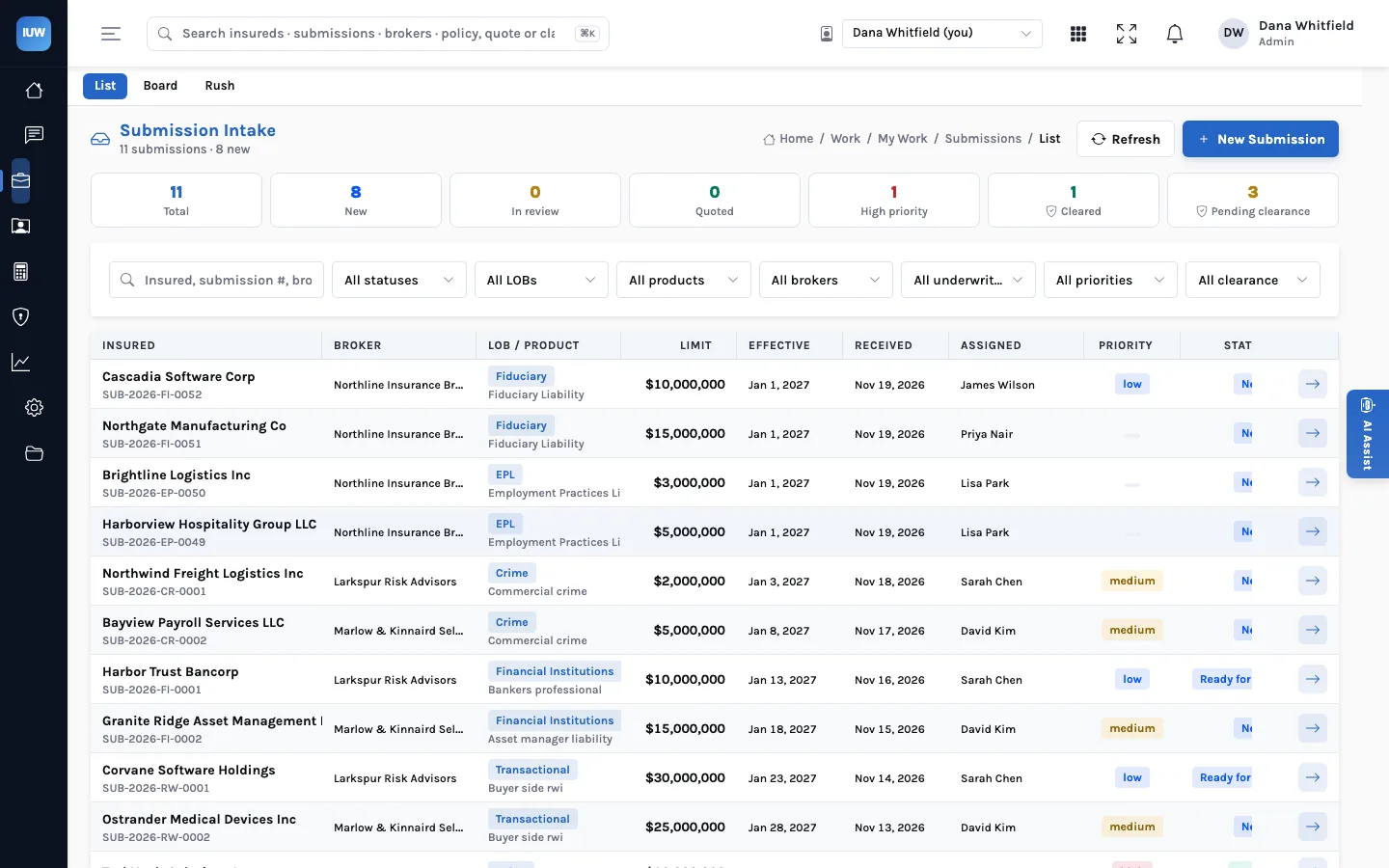
- Submission Intake counts total, new, in review, quoted, high priority, cleared and pending clearance, and filters by status, line, product, broker, underwriter, priority and clearance.
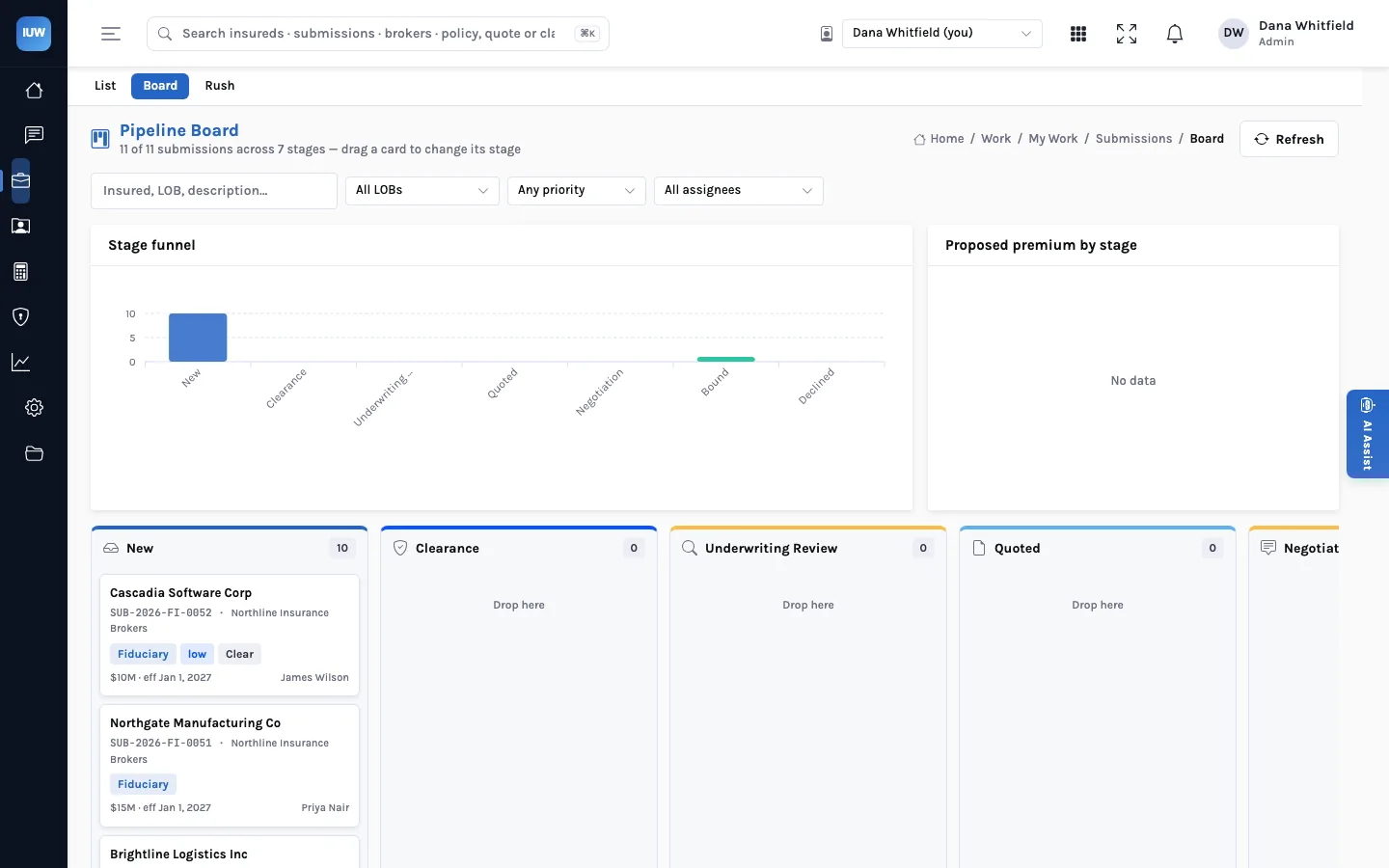
- The pipeline board shows a stage funnel and proposed premium by stage, with one card per submission you can drag between stages.
- Agent activity lists every run: running, waiting on a person, done or needing attention, and where it stopped.
The situation
Monday at 8:30 for Lisa
Lisa (fictional) runs the intake desk for the management liability team at Harborline Specialty. Eleven submissions are in the workspace after the weekend. Her job is to make sure each is assigned, cleared and moving, and that nothing waits on someone who is away.
1. Submission Intake
The list opens with counts across the top (total, new, in review, quoted, high priority, cleared, pending clearance) and a filter for each column. Lisa filters to pending clearance first, because nothing else can happen until clearance is done.
2. The pipeline board
The board view shows the same submissions by stage: new, clearance, underwriting review, quoted, negotiation, bound and declined, with a stage funnel and proposed premium by stage above the columns. Filters narrow it by line, priority and assignee; a card can be dragged to change its stage.
3. What the agents did
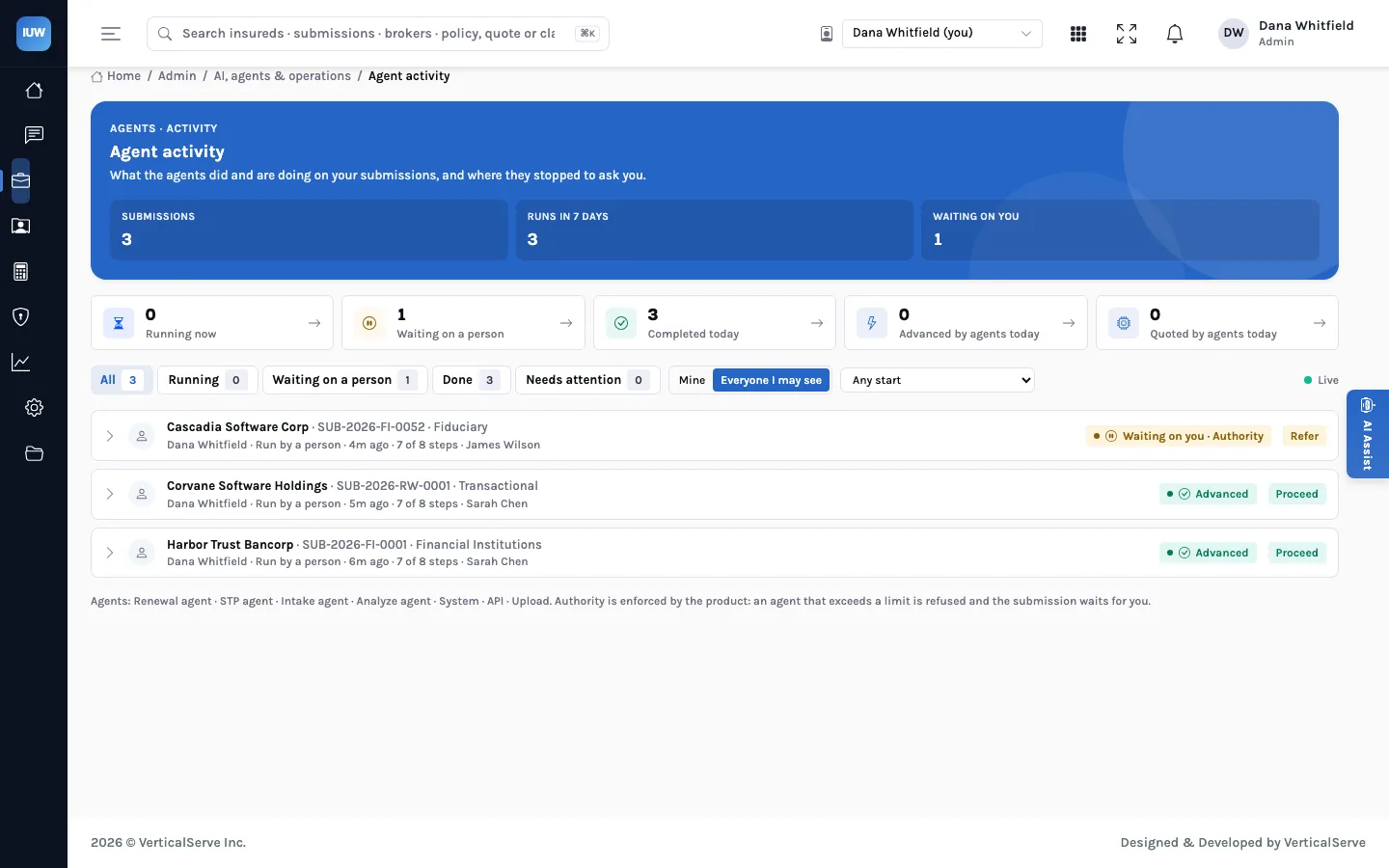
Agent activity answers the overnight question. The top row counts runs running now, waiting on a person, completed today, advanced by agents today and quoted by agents today. Each run in the list shows the submission, who started it, how many steps ran and where it ended: advanced with a proceed, or waiting on you for authority. Mine and Everyone I may see switch between the person's own book and the team's.
4. What Lisa does with it
- 1Clear the clearance queueoperations
Open each submission pending clearance and resolve any flag (a possible duplicate, a broker of record question) or route it to compliance.
- 2Check the waitsoperations
For each run waiting on a person, check the person is in. If not, ask the manager to reassign or answer it.
- 3Unassigned and rushoperations
Use the Rush tab for anything with a short effective date, and assign anything without an owner.
- 4Leave the ready ones aloneoperations
Submissions the agents advanced to ready for underwriting are the underwriters' to pick up; they appear in their What needs me.
A few habits that help
- Start from counts, not the list. The numbers across the top of Submission Intake tell you which filter to open first; pending clearance and high priority are usually the two that matter at the start of a day.
- Treat a wait as information. A run waiting on a person is the system working as intended. The question is only whether the right person knows.
- Filter for each team. Filtering by line and assignee gives each underwriting team its own view of the same board.
- Leave stages to the workflow. Dragging a card is there for corrections; most stage changes come from Analyze, the underwriter accepting a file, a quote or a bind.
Where assignments come from
Most submissions arrive already assigned. When one doesn't, Analyze routes it after clearance using the route rules, and the first rule that matches wins; a submission someone has already assigned is left alone. Under People & Teams, the Assignment tab shows the rules as sentences and, for any submission, who should take it, ranked by line remit, load against capacity and availability, with the reasons. The strategies are:
| Strategy | Who gets the next submission |
|---|---|
| Load | whoever has the most room against their capacity |
| Skill | line specialists first, then the most room |
| Round robin | each person in turn, skipping anyone away or full |
| FIFO | whoever has waited longest since they were last given work |
Capacity, cover and rebalancing
Each underwriter has a capacity: a number of open items, set per line or as a personal default (12 if nobody has set one). The Capacity tab marks someone as high once they pass two thirds of it and overloaded above it. When Lisa sees one underwriter overloaded and another with room, the Rebalance tab, open to managers, moves selected items from one to the other and shows everyone's load before and after. Nobody is filled past their capacity, every move is audited, and the receiver is told.
The Out of office tab answers the question in step 2. A person set as away with a delegate has their referrals follow the delegate until they are back, so a referral waiting on someone on holiday is a sign that no delegate was named.
Rush submissions
A rush is flagged by a person with a reason and carries an SLA in hours. Flagging it notifies the assignee and the team, and the submission shows a Rush badge in the queue, on its page and in the assignee's Up next. For Lisa, the Rush tab is the second filter of the morning, after pending clearance.
Lisa's morning checklist
- Pending clearance: resolve or route every flag.
- Rush: confirm each has an owner who is in today.
- Waiting on a person: check each wait has someone present, or a delegate.
- Agent activity: look for runs that need attention, such as a step that failed because a provider was down, and re-run that step.
- Capacity: rebalance anyone overloaded before the day's new submissions arrive.
Questions buyers ask
Can operations see everyone's work?
Agent activity switches between Mine and Everyone I may see; what a person may see depends on their role. An administrator's waiting list covers every parked submission.
Do we still need the shared mailbox?
Submissions can arrive from monitored mailboxes, uploads or the API. The mailbox can stay; what changes is that each email becomes a submission with an owner and a status, instead of a message someone has to remember.
Can the board be split by team?
Yes, by filtering on line, priority and assignee. Each team sees the same board narrowed to its own work.
Why it matters
The desk stops being a place where work is moved by hand and becomes a place where exceptions are handled. The agents' runs are visible, so an operations lead can see the difference between a submission that is waiting because it should be (a checkpoint fired) and one that is waiting because nobody noticed it.
Screens show a local InsightUW workspace with made-up insureds, brokers and underwriters. Nothing here is a statement about any real company's risk.